
Product development · rsk.files
Why I built my own file manager
Commander-style file managers are the best. How that belief became rsk.files, a digital Swiss Army knife — powerful, fast and still surprisingly calm.
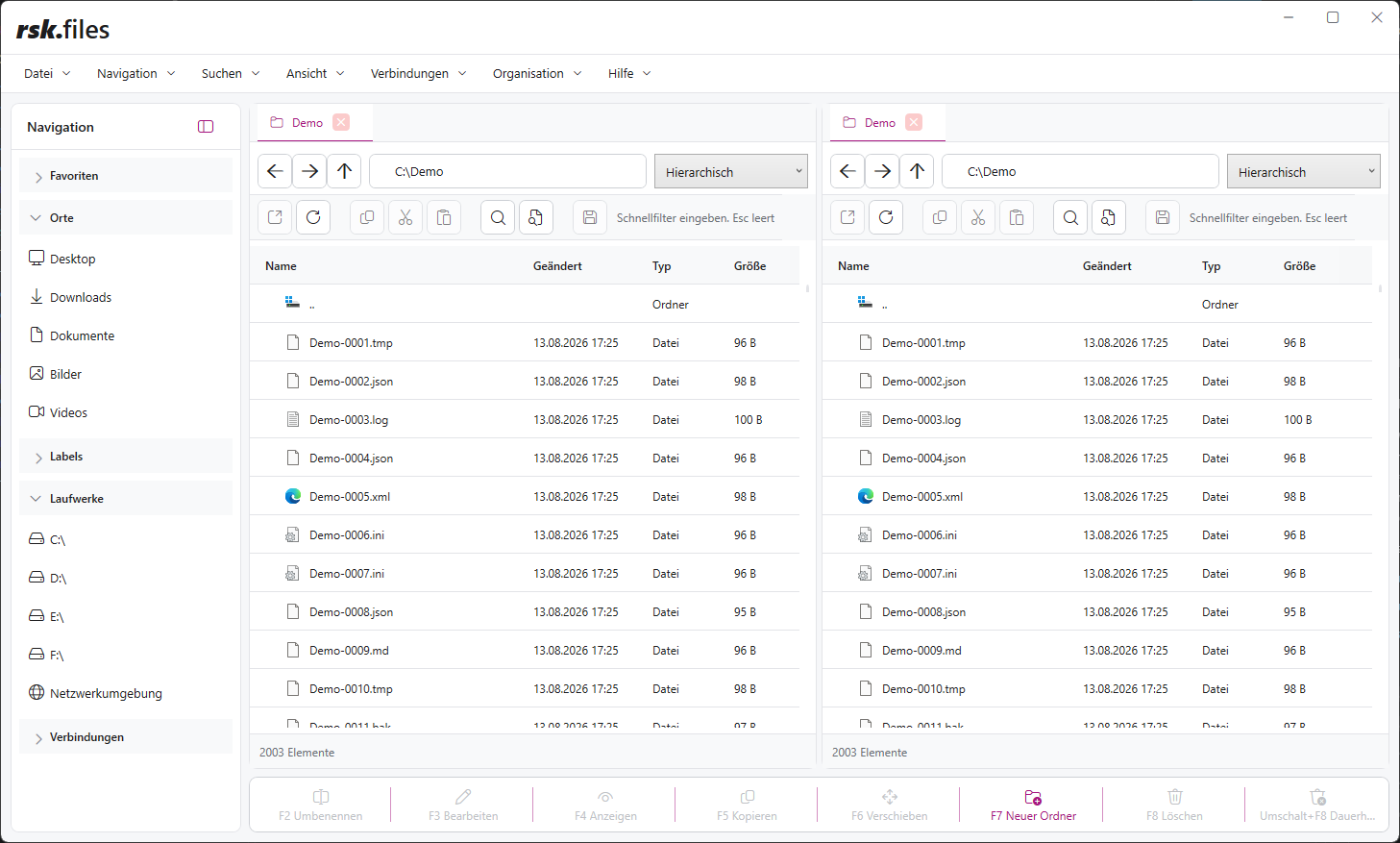
Let me say it straight away: Commander-style file managers are the best.
This is, of course, a completely objective statement. It just happens to have the minor flaw of matching my personal opinion exactly.
Anyone who has worked with two file panes soon understands why. Source on the left, destination on the right. Or the other way round. You can see where something comes from and where it needs to go. Copying and moving feel like a controlled action rather than a leap into the unknown. Two sides, one clear idea.
For many years, I wanted to build a file manager like that myself. More than an Explorer with a second window next to it. The tool I wanted for my daily work: as fast as a good specialist tool, as versatile as a Swiss Army knife and so easy to understand that you do not need to spend a weekend with the manual first.
That has now become rsk.files.
The idea that kept coming back
Some software ideas are loud. They demand attention, insist on a name immediately and would ideally like to be released that very evening.
rsk.files was different. The idea sat quietly in a drawer for a long time, resurfacing whenever working with files became unnecessarily awkward. When copying between two deeply nested folders. When switching between a network drive, an SFTP server and the cloud. When comparing two directories. Or at the moment when five Explorer windows were suddenly open on the screen and none of them seemed to know why it was there.
Every time, I thought: one day, I’ll build this properly.
The trouble with “properly” was that a file manager works in one of the most sensitive areas of a computer. Looking good is not enough. It has to copy reliably, explain conflicts clearly, keep long operations manageable and know exactly which side is the source and which is the destination at the crucial moment. A small mistake here is more than a cosmetic flaw. It can mean files end up in the wrong place — or are no longer there at all.
So the idea had plenty of time to mature. Eventually, “someone should build that” became a clear product vision.
Why two panes change so much
The Commander principle is older than many modern interaction concepts. That is precisely why it is so good. It does not try to hide every task behind a new animation. It shows the work as it is: something is here. It needs to go there.
In rsk.files, both panes are fully independent. Each has its own tabs, paths, views and filters. A local project folder can be open on the left and an SFTP server on the right. An archive waits in the next tab, alongside Dropbox, OneDrive or Google Drive. Source and destination remain visible even when the technical distance between them is considerable.
This saves more than clicks. It frees up mental space. Good tools retain the working context so people do not have to keep reconstructing it.
Saved workspaces take this idea further. Panes, tabs, folders and views can be saved together and reopened later. A recurring workflow then starts with the right workspace rather than ten minutes of preparation.
The Swiss Army knife and the question of pockets
I always wanted to build a file manager that could do a great deal. At first, that sounds appealing. But it is also a direct route to an interface that opens every drawer on launch and throws 73 buttons at the user.
A Swiss Army knife is not practical because all its tools are unfolded at once. It is practical because the right tool is there when you need it — and stays out of the way until then.
That became one of the most important design principles of rsk.files. Everyday tasks stay close at hand: navigate, select, copy, move, rename, delete. The more powerful tools are available without constantly pushing themselves to the foreground.
Those who need them can compare files and folders, synchronise directories, find duplicates, open archives like folders, generate checksums or search and replace content across many files. There are previews for images, text, PDFs and Office documents, an internal editor, a command palette and fully customisable keyboard shortcuts.
That is a lot. The art was not in adding yet another feature. It was in placing each feature where it felt natural.
A file manager no longer stops at drive C
Files have long since moved beyond local hard drives. They live on network drives, in archives, on servers and in various clouds. Yet almost every one of these storage locations comes with its own interface, its own navigation and its own little habits.
rsk.files treats them as different ways of accessing the same task. Local folders, UNC paths, FTP, FTPS, SFTP, Dropbox, OneDrive and Google Drive can be opened in either pane. Files can start locally and end up in the cloud. Or travel from a remote server directly to another storage location.
Beneath the interface, these worlds are anything but identical. A local move works differently from a transfer between SFTP and OneDrive. In use, however, that difference should only become visible where it really matters.
That was one of the most interesting development challenges: translating different providers into one shared, reliable workflow without hiding their particular characteristics. The technology can be complex. Using it does not automatically have to be.
Power is good. Control is better.
The more a tool can do, the more important it becomes to consider how safe it feels.
That is why rsk.files shows planned changes before they have far-reaching effects. Conflicts can be resolved deliberately. Synchronisation workflows have a plan you can review. Copy, move, upload and download operations enter a central queue, can be paused, reordered or cancelled, and do not block the entire interface.
That sounds less spectacular than the longest possible feature list. But to me, it is the crucial part. Efficiency does not mean software doing as much as possible as fast as possible. It means doing the right thing, keeping the path understandable and still being able to stop a mistake.
Especially when files are involved, trust is not an optional extra.
Easy to use does not mean limited
There is a persistent idea that an application is either simple and can do very little, or powerful and therefore requires struggling through complicated dialogues.
I do not believe that.
A good tool can welcome beginners while still offering depth to experienced users. Anyone who only wants to copy files from left to right should be able to do exactly that. Anyone working with keyboard shortcuts, saved searches, synchronisation profiles and multiple providers should not be held back artificially.
Simplicity does not come from leaving features out. It comes from clear terminology, good defaults, understandable states and an interface that knows its priorities. That takes considerably more work than an “Advanced” dialogue with twenty checkboxes. But it is also the kind of work I particularly enjoy.
Suddenly, it was no longer a dream project
At some point, rsk.files stopped being the application I wanted to build one day. It became the application I actually worked with.
I opened projects in it, compared folders, moved files between storage locations and noticed that I needed Explorer less and less. The old idea had become a real tool. One that did more than fill a gap in the product portfolio: it changed my own working day.
Of course, a file manager is never truly finished. There are too many file types, storage locations, ways of working and surprising edge cases for that. But it can reach a point where it is ready to belong to more people than its developer.
That point has now arrived.
rsk.files has been released. My Commander, my Swiss Army knife and probably the only pocket knife for which a central operation queue really makes sense.
You can discover rsk.files on ruesken.net and try all its features for seven days. Perhaps you will still use just one file window afterwards. But I did warn you: two panes can be pretty convincing.